Architecture & network
This page describes how Penfield is typically deployed and accessed in a customer environment. Diagrams are generic and do not represent any specific customer network.
High-level security architecture
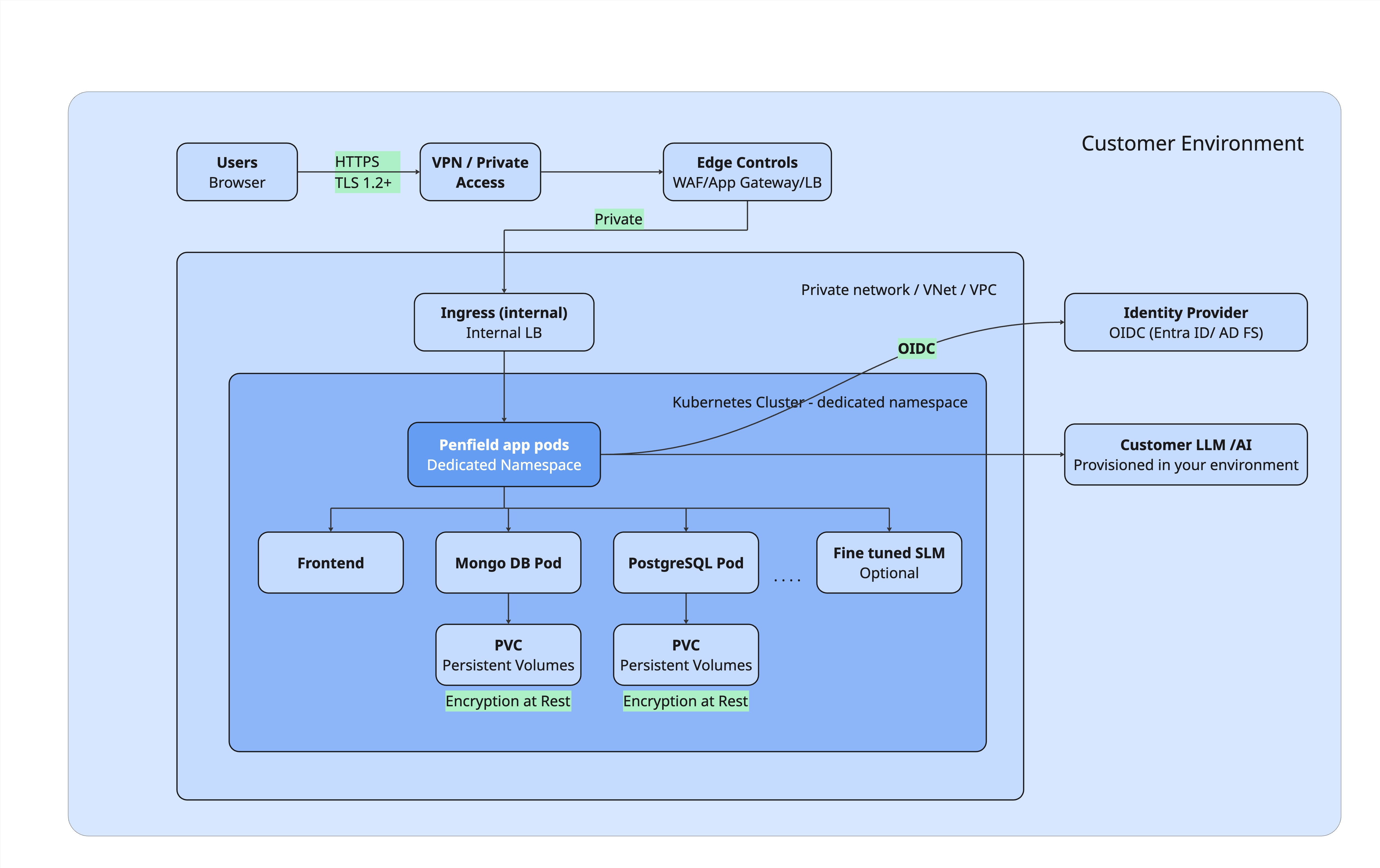
Penfield runs as containerized workloads in your Kubernetes or OpenShift cluster. Access is intended to stay on your private network path.
Design goals
- Not publicly exposed by default - access via VPN, zero-trust network access, or equivalent internal routing.
- TLS in transit - HTTPS to the application; you provide DNS and TLS certificates for the application hostname.
- Namespace isolation - install into a dedicated namespace so cluster RBAC and network policies can follow your standards.
- Platform flexibility - same application pattern on major managed Kubernetes platforms and OpenShift.
Deployment platforms
The security pattern is consistent across clouds. Only the edge and cluster services change.
| Platform | Typical edge path | Cluster |
|---|---|---|
| Azure | VPN / private access → WAF or Application Gateway → internal load balancer → ingress | AKS or Azure Red Hat OpenShift |
| AWS | VPN → WAF / load balancer → ingress | EKS or ROSA (Red Hat OpenShift Service on AWS) |
| On-prem / private cloud | HTTPS over VPN or private gateway → ingress | OpenShift or customer Kubernetes |
AI / model integration
Penfield uses AI models that stay in your environment. Typical options:
- Customer-provisioned LLM / AI services already running in your environment (provisioned and managed by you), or
- Fine-tuned SLM models deployed as an SLM service inside your Kubernetes cluster, usually on a GPU node.
In both cases, model traffic and data remain under your network, tenancy, and policies.
Network security controls
| Control | How it applies |
|---|---|
| Private reachability | Application hostname resolves and is reachable only on paths you allow (VPN, private DNS, internal LB). |
| Perimeter controls | You may place WAF, API gateway, or reverse-proxy controls in front of the cluster ingress. |
| Ingress | Traffic enters the cluster through an ingress controller you operate, typically configured for internal use. |
| TLS / HTTPS | Clients connect over HTTPS. Certificate and DNS ownership stay with you. |
| Segmentation | Cluster network policies, security groups, and firewall rules remain under your control. |
| Least privilege | Penfield is installed in a dedicated namespace in your Kubernetes cluster. It does not require broad cluster-admin rights; only the permissions needed to deploy and run the app in that namespace. |
What Penfield does not require
- A public internet-facing application endpoint (unless you choose to expose one).
- Customer application data to leave your environment for core product use.
- Penfield staff access to your cluster. There is no default access. Penfield gets cluster access only if you install the Penfield solution through the marketplace (where Penfield can manage the deployment), or if you already have a cluster and explicitly grant us access. Otherwise we have no access to your cluster.
Related pages
- Data & encryption - where data is stored and how encryption works
- Shared responsibility & FAQ - customer vs Penfield responsibilities
- Product deployment docs - install and configuration guides for operators